


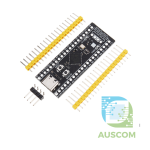
STM32F103C8T6 / C6T6 Blue Pill ARM Cortex-M3 Development Board Arduino STM32
Price range: $6.95 through $7.90 Inc. GST
You save
- Description
- Code Examples
- Additional information
- Reviews (0)
Description
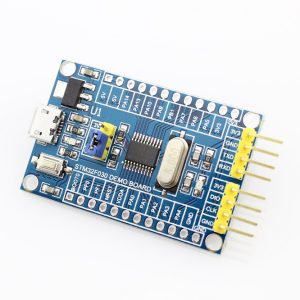
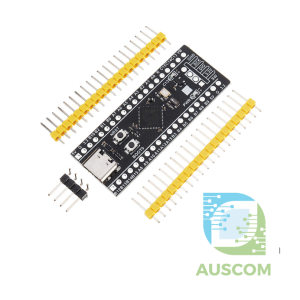
🔵 STM32F103C8T6 / STM32F103C6T6 Blue Pill Development Board – ARM Cortex-M3 MCU
The STM32F103 “Blue Pill” development boards are compact and powerful microcontroller modules based on the STM32F1 series from STMicroelectronics. Featuring the ARM Cortex-M3 core running at 72 MHz, these boards are a cost-effective solution for learning ARM programming, developing embedded systems, or building hobby and professional electronics projects.
Available in two variants (C8T6 & C6T6), the Blue Pill board provides excellent performance, a wide range of peripherals, and compatibility with popular development tools such as STM32CubeIDE, Arduino (STM32duino), Keil, and PlatformIO.
🌟 Key Features (Shared by Both Variants)
-
Processor: ARM 32-bit Cortex-M3 core, up to 72 MHz
-
Voltage: 2.0 V – 3.6 V operating range (3.3V regulator onboard)
-
Connectivity: Mini-USB interface for power and communication
-
Peripherals:
-
I²C, SPI, USART serial interfaces
-
USB 2.0 Full-Speed
-
Timers (up to 9, depending on variant)
-
12-bit ADC with multiple channels
-
-
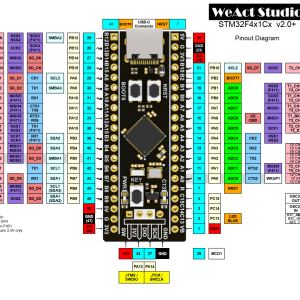
I/O: 37 GPIO pins, extended via 20×2 header
-
Programming: Standard SWD port, supports ST-Link, J-Link, J-Link OB
-
Crystals:
-
8 MHz high-speed crystal oscillator (PLL for 72 MHz operation)
-
32.768 kHz low-speed Epson crystal for RTC (higher precision, reliable start-up)
-
-
Indicators: Power LED and user-programmable function LED
-
Form Factor: Compact LQFP-48 package (48 pins), breadboard-friendly
🔍 Variant Details
🔹 STM32F103C8T6 (Blue Pill – Performance Version)
-
Flash Memory: 64 KB
-
SRAM: 20 KB
-
Timers: 9
-
Serial Ports: 3 (USART1, USART2, USART3)
-
Ideal For: Advanced projects requiring more memory and peripheral options, robotics, IoT gateways, and industrial control systems.
🔹 STM32F103C6T6 (Blue Pill – Compact Version)
-
Flash Memory: 32 KB
-
SRAM: 10 KB
-
Timers: 3 (no Timer 4)
-
Serial Ports: 2 (no USART3)
-
Ideal For: Lightweight applications, education, cost-sensitive projects, and simpler embedded systems.
🖥️ Development Support
The STM32 Blue Pill boards are supported by a wide range of software environments:
-
STM32CubeIDE (official ST IDE with HAL libraries)
-
Arduino IDE (STM32duino) – easy programming with Arduino libraries
-
PlatformIO / Keil / IAR – for professional embedded development
-
OpenOCD + ST-Link/J-Link – full debug support
This makes the boards ideal for both beginners learning ARM development and engineers working on production-ready embedded applications.
📦 Package Includes
-
1 × STM32F103C8T6 or STM32F103C6T6 Blue Pill Development Board (choose variant)
🚀 Applications
-
Embedded systems prototyping
-
IoT devices and gateways
-
Robotics and motor control
-
Data acquisition and monitoring
-
Industrial automation
-
Education and STEM projects
💡 Why Choose the Blue Pill?
The STM32 Blue Pill boards combine performance, affordability, and community support. Whether you choose the C8T6 for larger projects or the C6T6 for simple designs, you’re getting a reliable ARM-based platform backed by extensive tutorials and libraries.
⚠️ Note: These are compatible Blue Pill boards based on the original STM32F103 series design. Functionality matches the official ST microcontrollers, but component layout and finish may vary slightly.
📌 Code Examples – STM32F103 “Blue Pill” (C8T6 / C6T6)
⚠️ IMPORTANT – READ BEFORE USING THIS BOARD
Most STM32F103 “Blue Pill” boards — including the C8T6 and C6T6 variants — do NOT come with an Arduino-compatible bootloader preinstalled.
This means:
✅ You cannot upload code via the USB port out of the box
❗ You must program the board using an ST-Link USB programmer
Once a bootloader is flashed, you may upload via USB-Serial or USB depending on the bootloader type — but the first upload always requires ST-Link.
You will need:
-
ST-Link V2 USB Programmer
-
4 jumper wires
-
Optionally: Arduino bootloader or STM32duino bootloader if you want USB uploads later
📌 Wiring for Flashing Bootloader (ST-Link → Blue Pill)
| ST-Link Pin | STM32 Pin |
|---|---|
| SWDIO | SWDIO |
| SWCLK | SWCLK |
| 3.3V | 3.3V |
| GND | GND |
⚠️ DO NOT use 5V when flashing. The SWD interface uses 3.3V only.
Once connected, you can:
-
Flash the Arduino bootloader
-
Flash the STM32duino bootloader
-
Upload firmware directly via ST-Link (no bootloader required)
📌 Arduino IDE Setup (After Bootloader Is Installed)
-
Open Arduino IDE
-
Go to File → Preferences
-
Add this URL in Additional Boards Manager URLs:
-
Install STM32 MCU Boards in Boards Manager
-
Select board:
→ Tools → Board → STM32 Boards → “BluePill F103C8 / F103C6”
-
Choose upload method ST-Link or Serial (if bootloader installed)
🔧 Example 1 — Blink LED (Arduino IDE)
The onboard LED is normally connected to PC13.
⚡ Example 2 — PWM Output (Arduino IDE)
Use PA8 for hardware-timed PWM.
📈 Example 3 — ADC Input (Arduino IDE)
Reads analog voltage on PA0.
🛠 STM32CubeIDE (HAL) Blink Example
For customers wanting pure ARM development:
🧠 Notes & Tips
✔ ST-Link is required unless a bootloader has been flashed
✔ Many boards ship with the wrong USB pull-up resistor (R10) → USB upload may fail
✔ ST-Link upload is the most reliable method
✔ C8T6 vs C6T6 difference is only flash size (64 KB vs 32 KB)
✔ Functionality and code examples are identical
✔ You can upload without installing a bootloader by using ST-Link every time
Additional information
| Weight | 40 g |
|---|---|
| Dimensions | 260 × 160 × 20 mm |
| Chip | STM32F103C8T6, STM32F103C6T6 |
Only logged in customers who have purchased this product may leave a review.













Reviews
There are no reviews yet.